|
|
We've been busy improving and adding things to Teamio directly from your feedback — thank you! This is a big one. We've launched Advanced Production Trends, a complete analytics system for tracking your production over time, plus major improvements to Forms, and a bunch of updates across the platform. |
📊 Advanced Production Trends — Net Production Analytics
Production Per Hour on Your Huddle Page
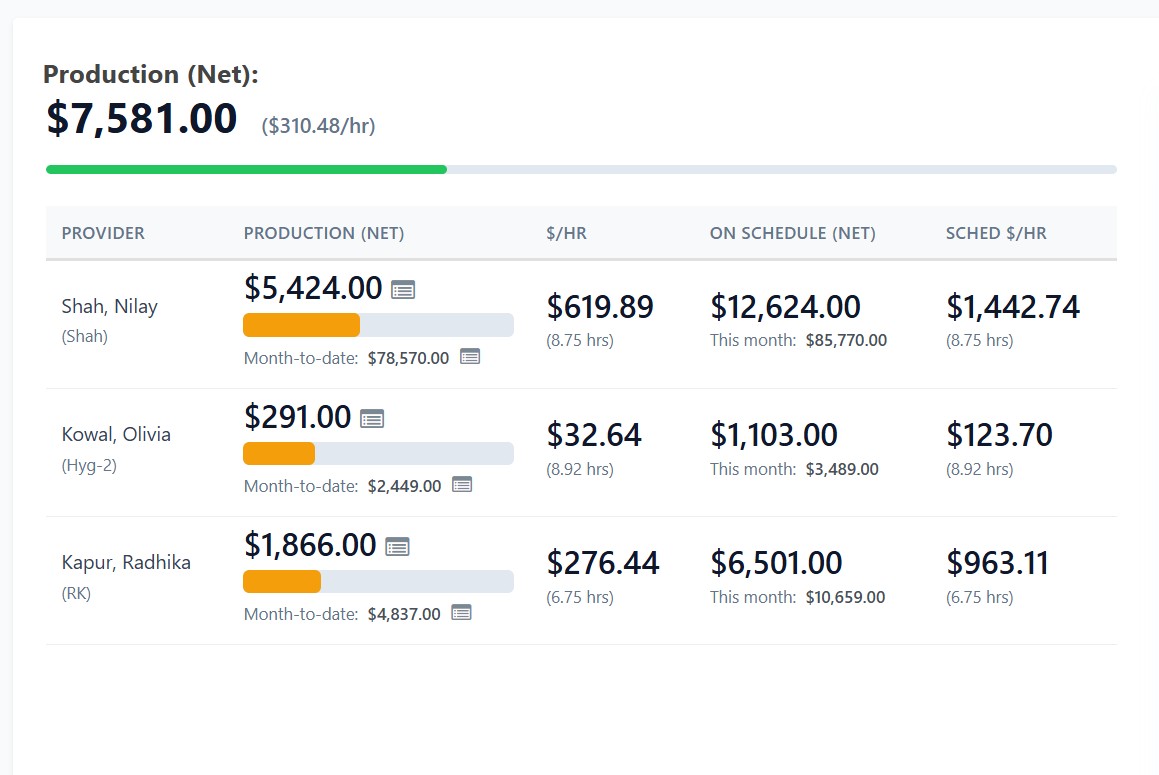
Your main Huddle dashboard now shows $/hr (production per hour) for each provider, right next to their daily production. You can finally see if you're working smarter or just harder. Clinical hours are calculated automatically based on your schedule, minus lunch breaks (which you configure per provider per day). |
|
Advanced Production Trends Panel
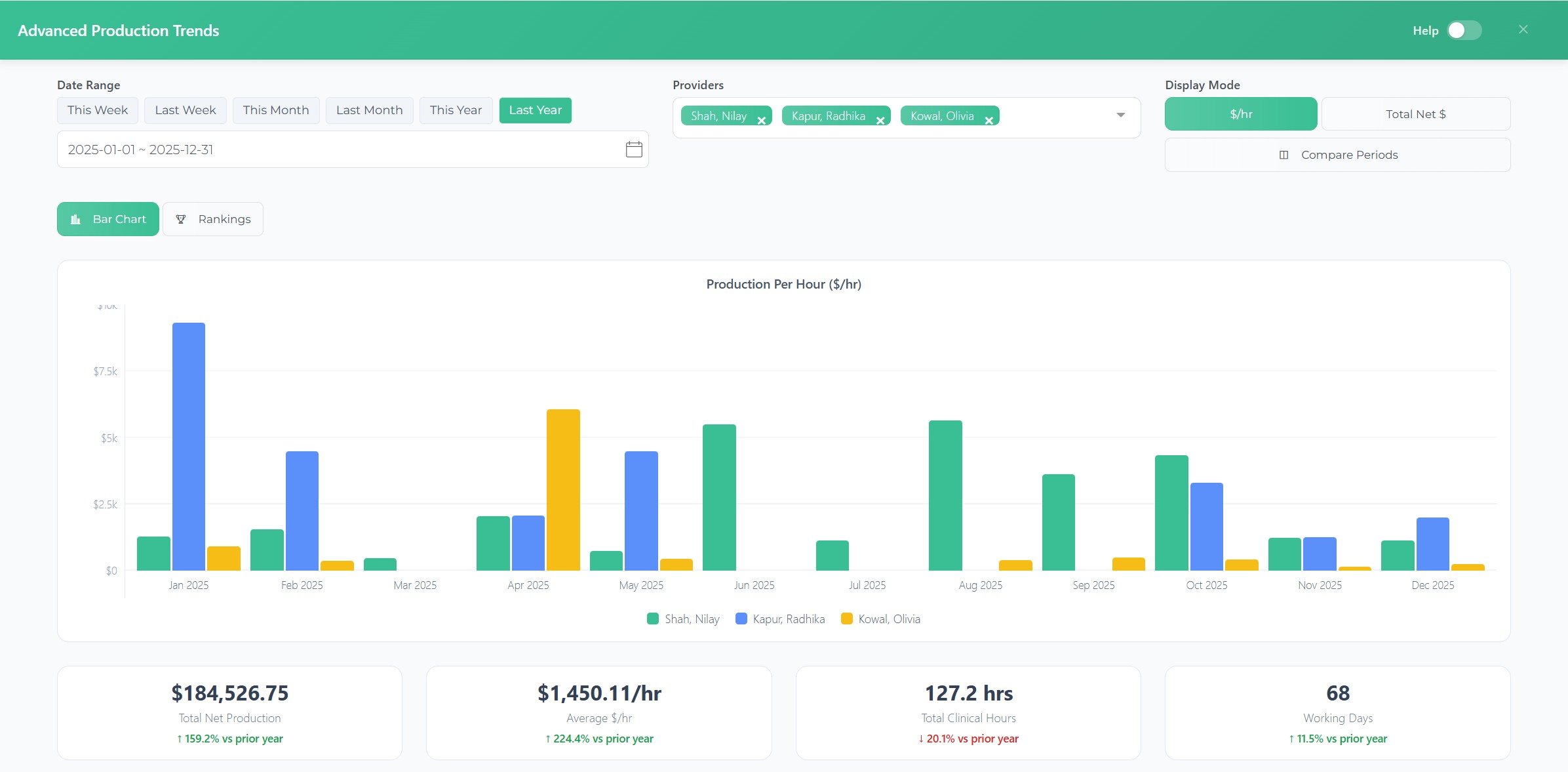
Click "Advanced Production Trends" on your Huddle page to open a full analytics panel with production trends over time. Choose any date range (last week, last month, this year vs last year, or custom), filter by provider, and toggle between $/hr view and total production view. The chart automatically adjusts — daily view for short ranges, monthly view for year-over-year.
|
|
|
|
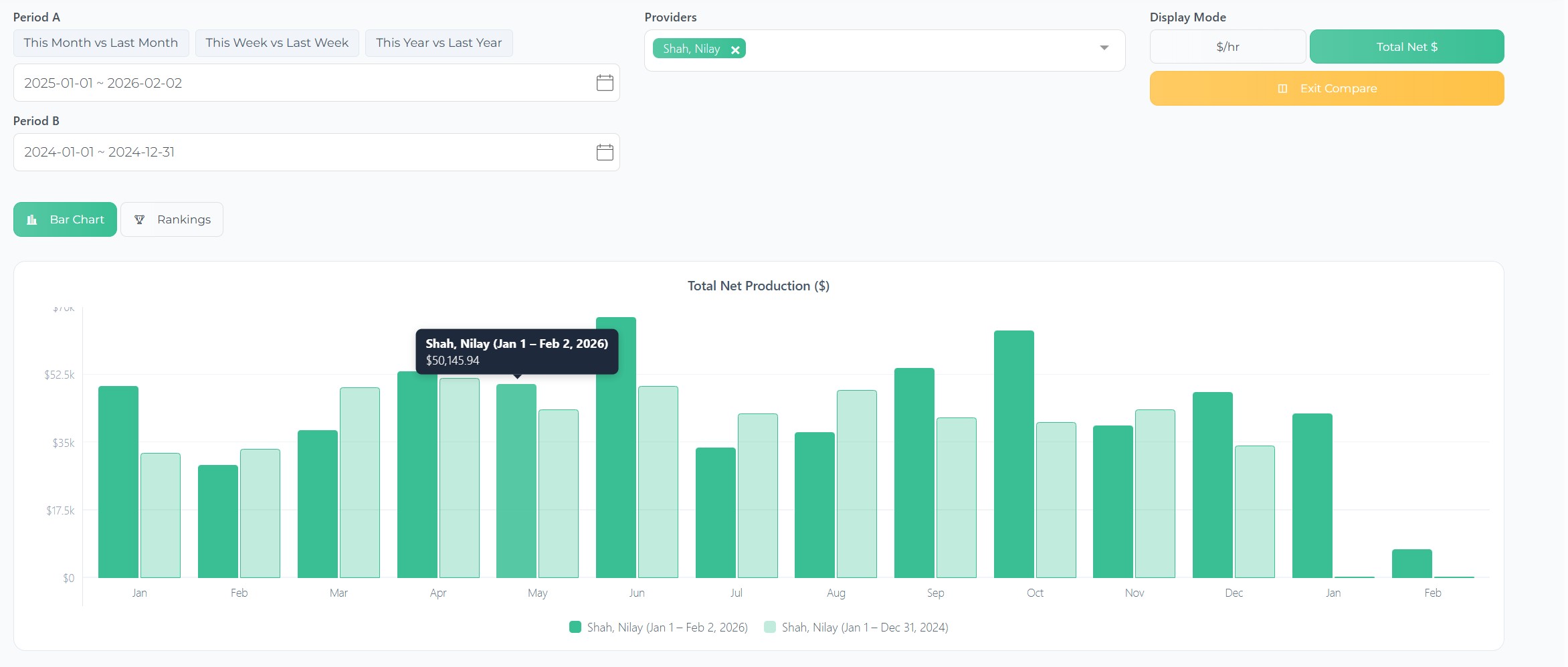
Comparison Mode — Compare two time periods side by side. "This Month vs Last Month," "This Year vs Last Year," or any custom date range. The chart shows both periods with normalized labels so you can see exactly where you're up or down. At the end of the day, production numbers only matter when you compare them to something.
|
|
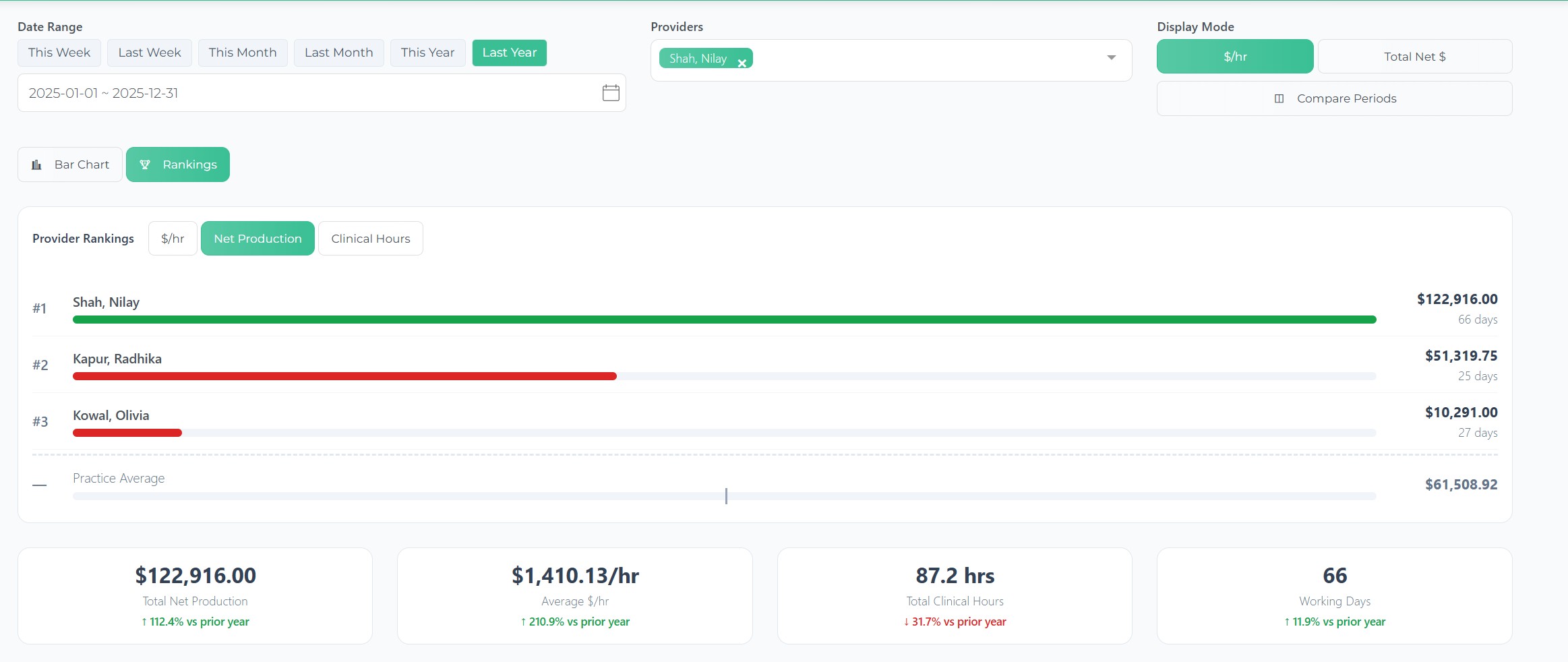
Provider Rankings — If you have multiple providers, the Rankings view shows a leaderboard sorted by $/hr, total production, or clinical hours. Each provider gets a color-coded bar (green = above practice average, yellow = within 10%, red = below average). Super helpful for multi-provider practices and DSOs.
|
|
Trend Indicators — Every summary metric card shows a percentage trend vs the previous period. "↑ 12.4% vs last month" or "↓ 3.2% vs last week." No more manually comparing numbers between time periods — it's automatic.
|
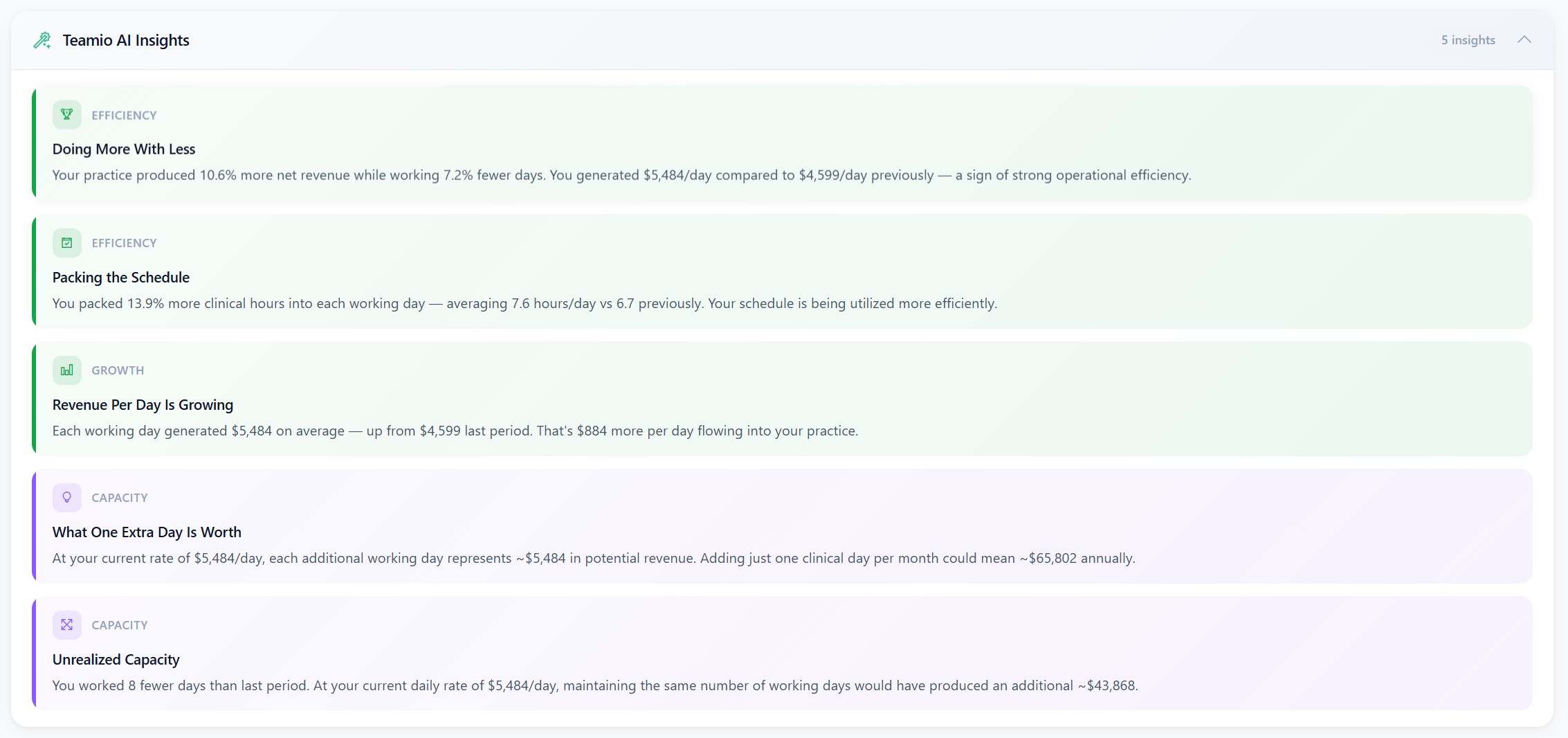
This is our favorite part. The panel now includes an AI-powered Practice Advisor that analyzes your production data and gives you plain-English coaching insights.
Things like: "Your practice produced 10.7% more net revenue while working 7.2% fewer days — you're working smarter, not harder."
Or: "At your current rate of $5,488/day, each additional working day represents ~$65,856 annually."
It surfaces patterns you'd never spot by looking at individual numbers.
This is where Teamio is headed — eventually, you'll be able to chat with the AI and ask questions about your production data directly.
|
|
📝 Forms — Spanish Language & Smart Pre-fills
Spanish Language Auto-Detection — Teamio Forms now automatically display in the patient's preferred language based on their Open Dental language setting.
No more manual switching on shared computers. If a Spanish-speaking patient opens a form, it shows in Spanish. Next patient (English in OD) sees it in English. Each patient gets the right language automatically.
Pre-fill Patient Name — Consent forms and other "OTHER" type forms can now auto-populate with the patient's name from their Open Dental record (Last, First format). The field is read-only, so no typos, no manual entry, and the name matches the OD record exactly. Super helpful for legal consent forms.
Pre-fill Today's Date — Date picker controls can now auto-fill with today's date (read-only). Patients don't have to type or tap through a date picker on mobile. Eliminates typos and saves time on intake forms, consent forms, or any form that needs "today's date." |
🏢 Multi-Clinic Support - Open Dental Clinics - Phase I completed
We've completed phase I of Open Dental Clinics support.
We say Phase I because we plan on bringing different dashboards for Operations / Regional managers to see multi-clinic dashboards on ONE screen without switching.
Clinic Name in Header — If you're using Open Dental Clinics (multi-location), the current clinic name now displays in the user settings dropdown. Staff can instantly see which location they're working in — critical when you're managing multiple clinics.
Data Refresh on Clinic Switch — Switching clinics now properly refreshes all data. Previously, if you switched clinics while staying on the same page (like Dashboard), the data wouldn't reload. Fixed. |
🔐 Login Improvements
Google Account Chooser — When logging in with Google on shared clinic computers, the account selection popup now appears every time instead of auto-selecting the last logged-in account. No more signing out of Gmail before logging in with your own account.
Mobile Touch Responsiveness — Login buttons (Google and Microsoft sign-in) now respond instantly to taps on mobile/tablet devices without the typical 300ms delay. Also added keyboard accessibility (Enter/Space key support, visible focus rings).
|
⚡ Practice Pulse — Fixes
Provider Color Borders Restored — Patient cards in Practice Pulse display a colored left border indicating the assigned provider (e.g., Dr. Smith = blue, Dr. Jones = green). This was accidentally broken during a UI update. Fixed — color-coded borders are back. No More Patient Duplication on Drag-and-Drop — Dragging a patient from check-in to an operatory would sometimes create a duplicate (patient appeared in both locations temporarily). Fixed with multi-layer Firebase race condition handling. Drag-and-drop now works reliably. |
📧 Email Templates — Custom Subject Lines
Set Custom Email Subject Lines — Email templates in the Wiki editor now have a dedicated "Email Subject" field. Control what patients see in their inbox. If left empty, the first line of content is used (previous behavior). When saving without a subject, you'll get a confirmation dialog with an option to go back and set one. Verified Email Display in Preview — The email template preview now shows your practice's actual verified email address in the "From" field instead of a placeholder. |
|
🛠️ Currently in Development:
Automated Email Reports End of Day / Week / Month
Customized Email reports - daily, weekly, monthly reporting of details you want customized to your practice sent whenever you want to your emails - this will be available to all of our offices on any Teamio subscription at no extra cost
Patient Campaigns (mass text / email with custom templates - to be included in our Patient Engagement subscription at no extra cost) & Analytics
Online Appointments Analytics |
|
p.s. After this update goes live, don't forget to do a hard-refresh (Ctrl+Shift+R on Windows, Cmd+Shift+R on Mac) to load the latest version.
p.s.s If you're not using Teamio yet, and are looking to streamline your operations and put systems in place that drive ACTUAL RESULTS - schedule a one-on-one call to get an in-depth look at how our Open Dental offices are utilizing Teamio! |
|
|