|
|
Hello everyone,
We've launched a bunch of new features, revamped the UI, and currently in development for some big features.
We're pumped for what is to come in 2026 and we're starting it with some massive updates!
|
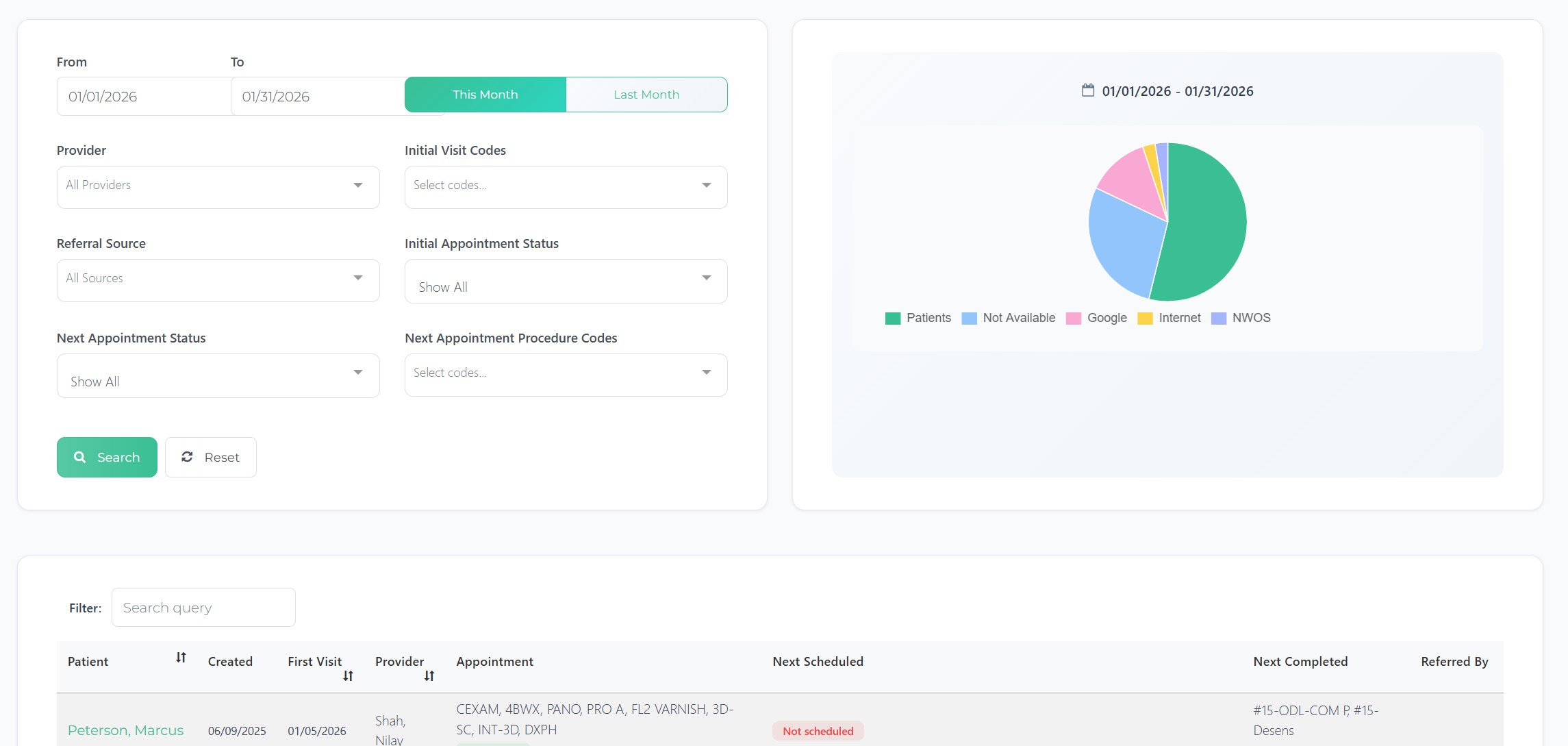
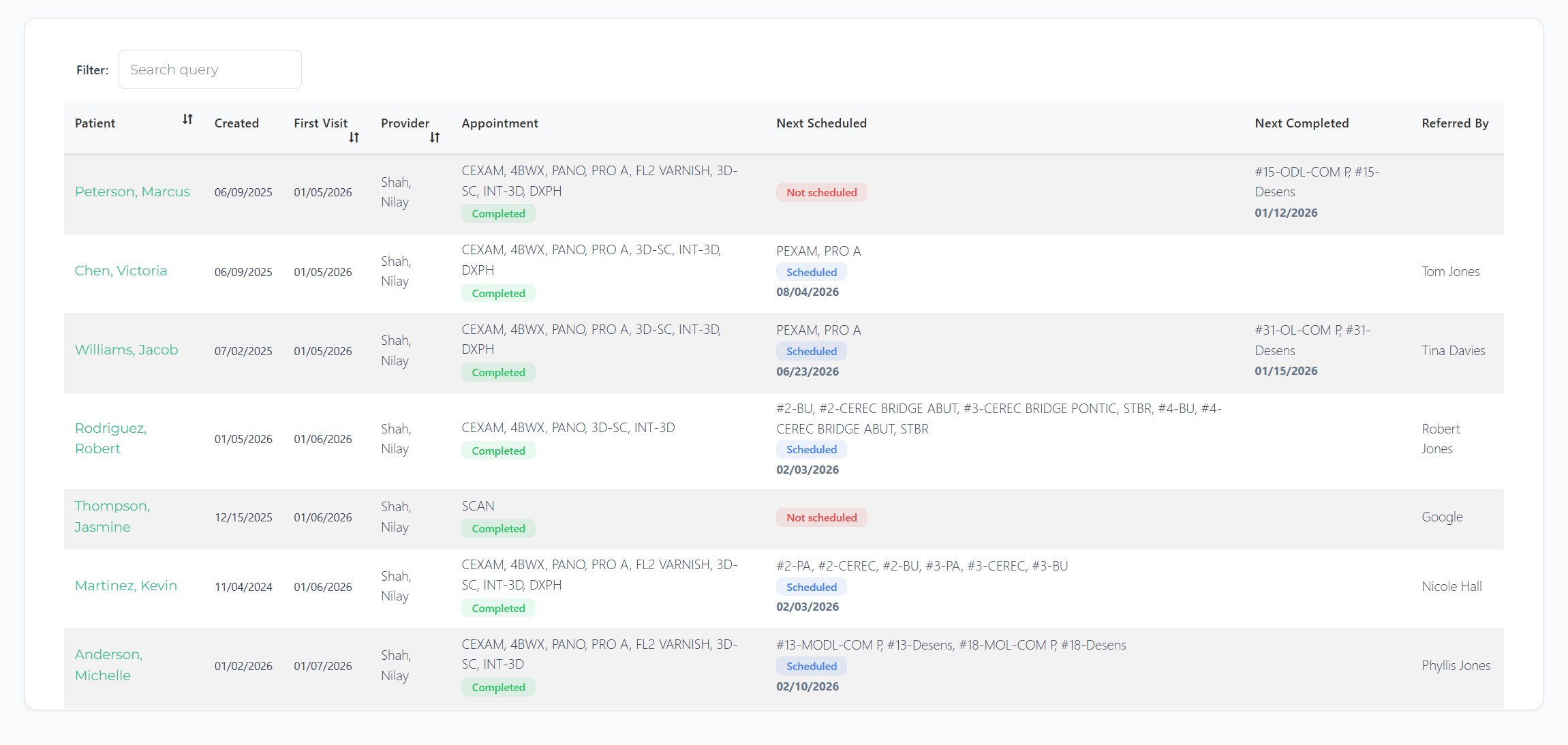
📊 New Patient Report
In a given time frame, you'll be able to see the new patients scheduled / seen within that time frame.
And for each of the new patients, you should be able to see in the columns the following information: When the appointment was CREATED in Open Dental Date of their first visit Description of their New patient appointment and Status (scheduled / completed) Next Scheduled: If a new patient has already completed their initial appointment, the Next Scheduled column will show ANYTHING that is in "scheduled' status in Open Dental AFTER the date of the initial appointment along with procedures in those appointment Next Completed (or Recently Completed): Any appointment that is "completed" status in Open Dental that falls on the same day as their new patient appointment or in future. Referred By: Lists the patient name who referred this patient, or if your team is marking in Open Dental where the patients are coming from (billboards, google ad, FB ads, fliers, etc.) - it will show up here.
|
|
|
|
|
📝 Forms Enhancements
Visual Form Builder Upgrades
Conditional Logic Builder - New visual builder for creating conditional visibility rules with live field dependency tracking Section-Level Conditional Logic - Entire sections can now show/hide based on patient responses, not just individual fields Pin Forms - Pin frequently-used forms to the top for quick access Forms Sorting - Sort forms and submissions tables by any column Improved Auto PDF Exports - Fixed rendering issues for cleaner PDF outputs
|
⚡ Workflow 2.0 (NEW WORKFLOW BUILDER)
Modern Visual Editor
Node-Based Workflow Builder - Completely redesigned visual workflow editor Trigger-Aware Options - Send timing options (Email, SMS, Task) intelligently adapt based on trigger type Parallel Branch Execution - True parallel workflow branches with independent error handling
|
✅ TASKS: introducing Subtasks and other enhancements
Subtasks - Break down tasks into smaller, trackable subtasks Auto-Save Subtasks - Subtasks save automatically as you type Task Visibility Indicators - See at-a-glance which tasks have subtasks or other attributes Improved Avatar Display - Fixed display issues for user avatars in task assignments
|
✍️ WIKI FEATURES
Public Wiki Pages - Share wiki pages publicly with shareable links YouTube Embed Support - Embed YouTube videos in public wiki pages Image Compression - Automatic image optimization for faster loading Search & Pagination - Search across wiki pages with paginated results Pin Wiki Pages - Pin important wiki pages to the top Improved Paste Handling - Better handling when pasting from PDFs, Word docs, etc.
|
🔍 PRACTICE PULSE
Smoother Drag & Drop - Improved drag and drop for appointment management On-Demand Initialization - Initialize Practice Pulse without waiting for nightly sync Move to Op Dropdown - Restored and improved operatory reassignment Bug Fixes - Resolved blank screen and data inconsistency issues
|
🎨 UI MODERNIZATION
Updated pages with consistent modern design:
|
|
🛠️ Currently in Development:
Open Dental Clinics Integration & Multi-Office Support
Independent Site Infrastructure - Multi-office customers being able to have fully independent site configurations Significant Change to our back-end systems as well as Sync software installed on in-office Servers for offices on Clinics
Spanish Language Support
Automatic Patient Language Detection - Forms now auto-detect patient language preference from Open Dental and display in Spanish when appropriate Spanish Form Translation - All patient-facing forms can be translated to Spanish with one click Wiki Page Translation - Wiki pages can be translated to Spanish using AWS Translate, with SMS/Email preview Visual Indicator - Spanish-enabled forms show a clear indicator in the forms list
Online Appointments |
|
p.s. When you're in the office next time, don't forget to do a hard-refresh by doing the following (everyone on the team should do this) to make sure you're looking at our latest update:
1) Log out, then 2) On the log in screen, - Hold down Ctrl (Control) + Shift + R, Or
- Hold down Ctrl (Control) + Shift + click the Reload button. 3) Log in
p.s.s If you're not using Teamio yet, and are looking to streamline your operations and put systems in place that drive ACTUAL RESULTS - schedule a one-on-one call to get an in-depth look at how our Open Dental offices are utilizing Teamio! |
|
|