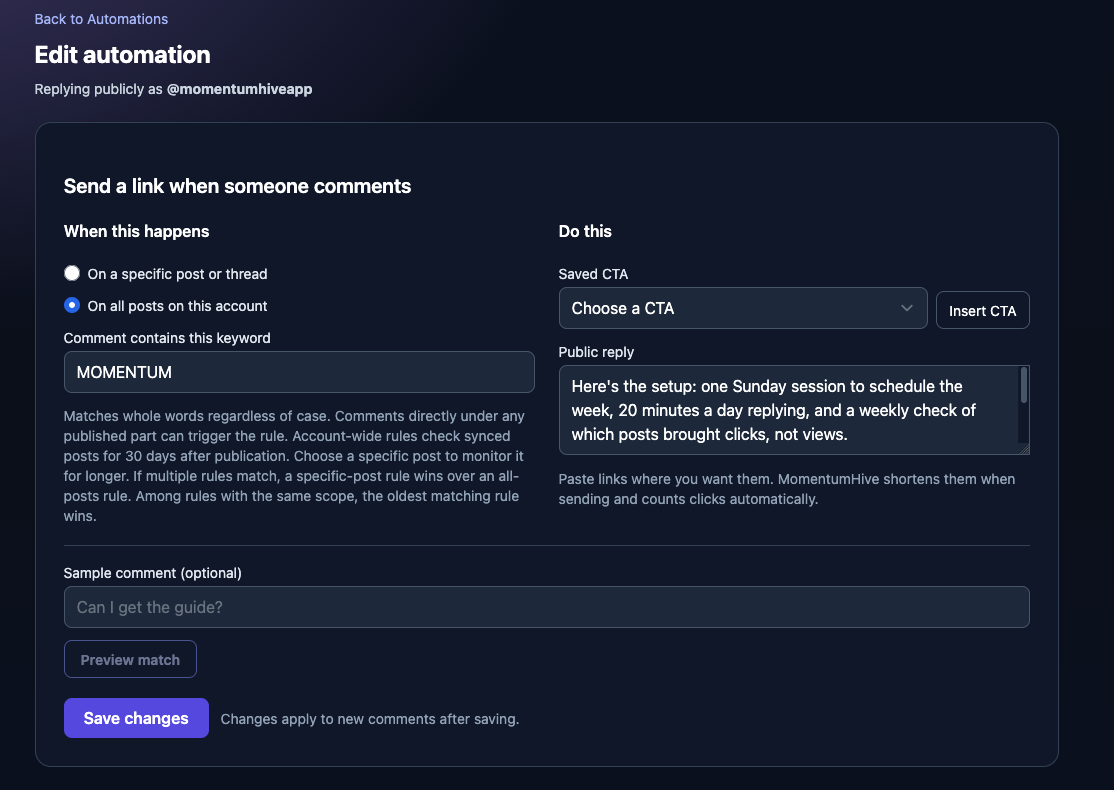
Pick a keyword, like GUIDE, CHECKLIST or PRICE.
Write the reply once, with your link in it.
When someone comments that word, MomentumHive replies to them publicly with your message.
Every link in the reply is tracked, so you can see how many people commented the keyword, how many got the reply, and how many clicked.
A few ways to use it:
A free resource: “Comment CHECKLIST and I’ll send it over”
A product: “Comment PRICE for the details”
A course or waitlist: “Comment JOIN to get the link”
You can run a rule on one specific post, or on all your new posts at once.
Each person gets one reply per comment, so nobody gets spammed.
Even easier: just ask your AI assistant
MomentumHive connects to AI assistants like Claude or CHatGPT.
The technical name is MCP, which is a connector that lets your AI assistant use MomentumHive on your behalf.
In practice, you don’t have to click through any settings. You can type something like:
“Set up a keyword reply on my latest post. When someone comments GUIDE, reply with my checklist link.”
Your assistant shows you the exact reply first, you say yes, and it’s live.
The same goes for checking results: ask “how many people clicked my GUIDE link this week?”
and you get the answer.
Same feature, no menus.
Keyword automations are included in the Creator and Pro plans.
Set up your first keyword reply →
If you set one up, reply to this email and tell me which keyword you’re using.
I read every reply.
Zvonko
Founder, MomentumHive